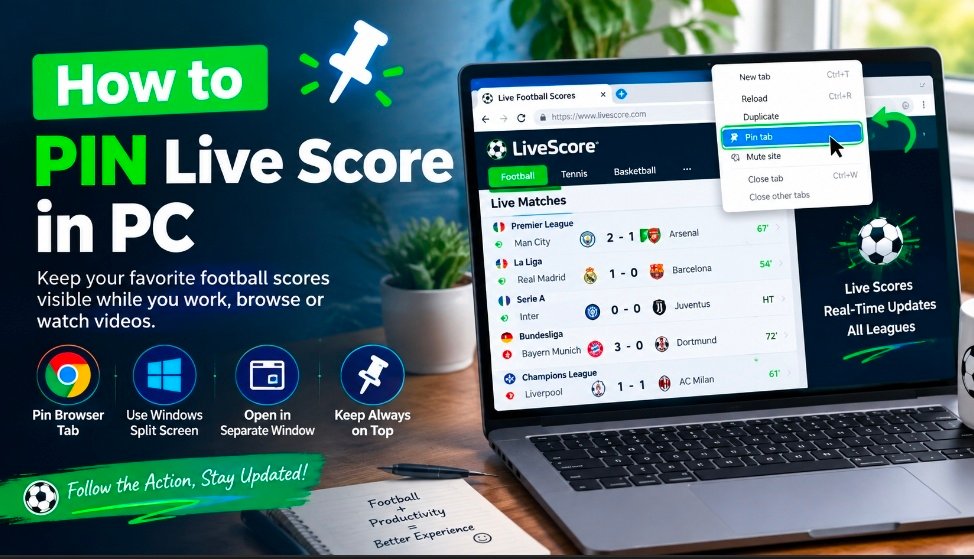
How To Pin Live Score in Pc: Easy steps to Keep Football Scores on Screen
100percentsurewins remain your free football predictions and Betting tips website that specialize in publishing daily soccer tips,betting tips, match analysis, odds and predictions across different leagues and betting markets globally.
It's more easier following a football match on a computer via live score while you also browse other pages on your phone, work, study or watch comedy skits. If you're looking or you have in any way searched " How to PIN live score in PC " with your phone, we have some easy methods to share with you in other to assist, depending on your browser or desktop settings.
In this, you don't even need a particular Sports application to get all you need. A small floating window, browser tab,split screen mode,or even an always on tab utility can help you achieve this goal in your match information views.
In this page, we will particularly guide you on How to PIN live score in PC, including browser tab pinning, picture in picture features, windows split screen,and dedicated always on tab options.
What Does It mean to Pin live score in PC?
According to Semrush metrics Analysis, it shows that people are searching for How to PIN live score in PC and when people are wanting to pin live scores , they usually want the active football score match easy way access while they make use of other applications in their system or Mobile phone.....
You can possibly have your live match page open in your Google Chrome and still want to continue using another website without repeatedly switching from one tab to another. Pinning and keeping the screen visible will solve the problem.
- Pin the Livescores website tab in your browser.
- Open the Livescore tab in the separate window.
- use the window snap to to place the score beside another application in your pc
- use and always on top features to keep small window above others.
- Use picture in picture in where it's supported.
You can use one among the above features steps, depending on what you want to do with your pc.
How to PIN Live Score in PC Using Google Chrome
The most simplest way is to pin your Livescores tab in your Google Chrome.
First, open Chrome and visit a reliable football livescore platform.then search for the live match you want to watch and open its live-score page.
As soon as the page is open, look closely at the right top of you chrome and click the browser tab at the top of the screen.
Select Pin from the menu.Chrome will automatically move the tab to the left side of the tab bar and make it smaller which you can still re-size if you want.
The tab will remain available in the tab even when you have many other pages open.
Note: This does not keep the score permanently visible on your desktop, but it makes the live-score page much easier to access for 2 hours and more.
Incase you're a football lover, this is just a simple way to make watching of matches and easier one for you....
Use Windows Split Screen to Keep the Score Visible
This is another good method that helps you to pin live score in PC and still be doing other things, it's called window snap...
Window snap allows you to place two different windows next to each other. This methods help you to read live score while working in another apps.
Steps: Open your live score page In your Google Chrome browser, press Windows key + Left Arrow/right depending on the site you want to place it or you want it to appear in your screen.
t
The browser window will automatically move to one side of your screen, then window will now allow you to select another window in the remaining space in the pc screen. This can now keep your football scores visible while using words, notepad and chrome or another program.
This particular method is mostly use when you're on larger PC monitors because you can dedicate one section of your screen to display match information.
Open Livescores in separate window
You can use this method , if you prefer using cleaner set-up, open the Livescore page in it own browser window.In your browser Chrome or another, rightclick the relevant tab you want and choose the one you wish to move or open it in a new window..
Then, resize your new window so that it will appear bigger in your desktop and place it at the corner of your screen. This gives you a simple live score dashboard without having switching tabs.
Keep a Score Window Always on Top
This method is for those who want the live score to remain visible at the top of other applications, an always on top features will be the best fit..
Note: Window doesn't provide universal always on topin all applications, but few apps you can use it includes Microsoft power toys utilities accepts this features called Always on top. After configuring it, you can Select a window and keep above other windows.
This method is useful when using small browser window containing live football scores. Always remember that third-party utilities can only be installed from trustworthy sources to avoid errors and keep it updated.
Can You PIN a Live Score While Watching YouTube?
100% Sure, and it's depending on the browser and the site, you can equally be combined to watch live-score window with YouTube.
YouTube is full-time useful for football news, match discussions, tactical explanations, interviews, and other video content.
However, video and live-score availability can vary by country, competition, broadcaster, and website.